
Spine and Leaf Practical Applications, eBGP
Overview
First off, here’s the reference diagram (YAML):
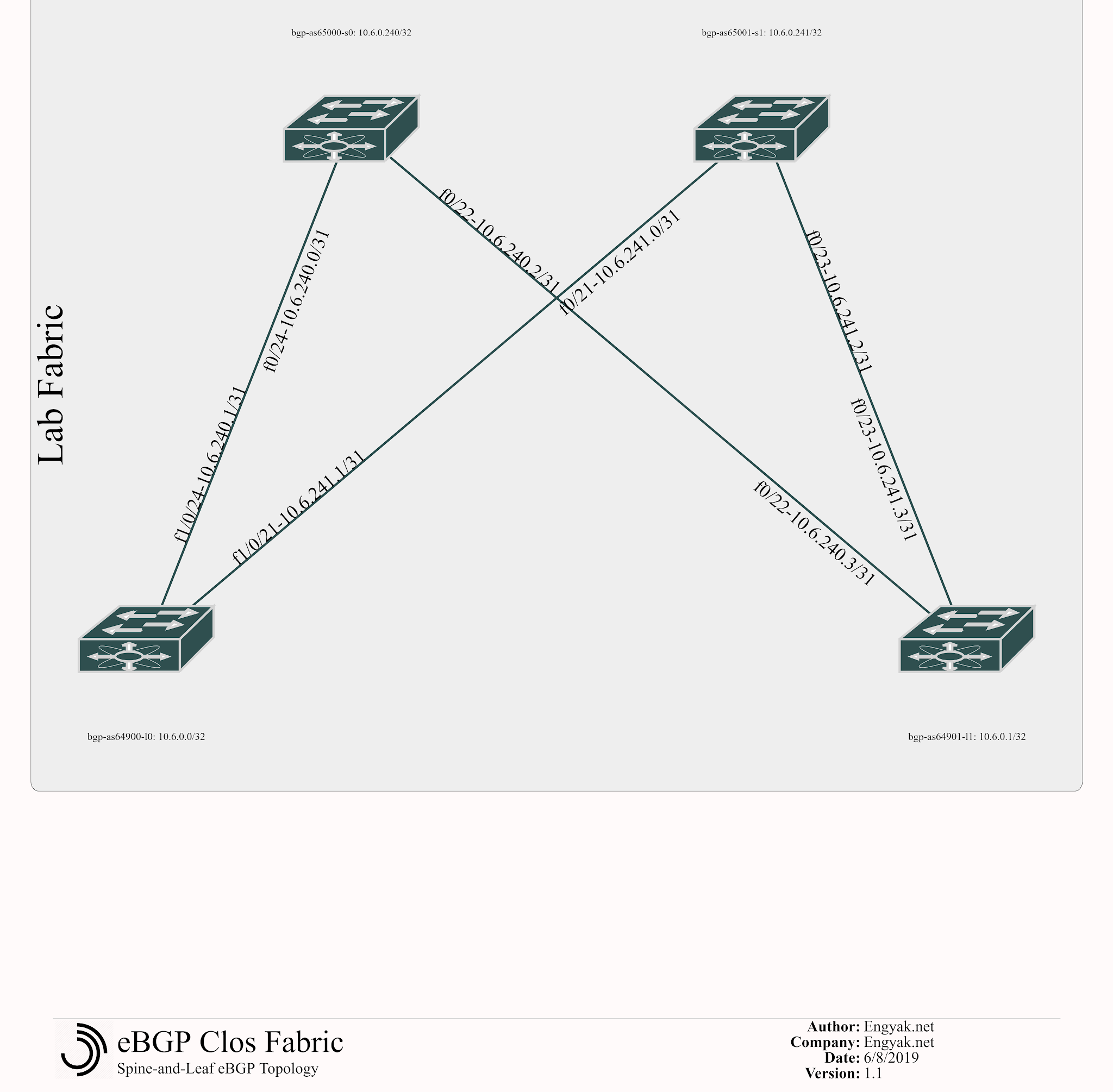
Assumptions about difficulty
Most people I’ve met outside of the carrier space are pretty intimidated by BGP, as it is truly impressive in scope. Here, we’re going to break-out BGP usage into two categories:
- iBGP: This is where all nodes have the same Autonomous system number. A great deal of complexity exists with this deployment model, because BGP’s primary loop prevention mechanism is a string with all of the autonomous system numbers to that route, counting each entry as a “hop” as it were.
- eBGP: Every single device has its own ASN. Loops are easy to prevent by simply reading the AS-Path.
eBGP is not very difficult to learn.
This is worthwhile, because BGP has a pretty substantial strength within data center networks, and that is an emphasis on reliability.
I’m not going to be doing a deep-dive on BGP here - but can recommend some truly excellent resources on the subject:
- BGP: Building Reliable Networks with the Border Gateway Protocol, by Iljitsch van Beijnum
- Pretty much anything written by Narbik Kocharians
How is BGP different from IGPs like OSPF, EIGRP?
First, we must examine some key differences between BGP and IGPs:
- IGPs are multicast-based, and dynamically generate peers. BGP is TCP-based and needs statically defined peers (note: you can define a dynamic range, which in a future example will be truly valuable)
- EIGRP has one area, OSPF generally supports up to 16 without getting specific hardware. BGP supports 65,536 with 2-byte ASNs, or 4,294,967,295
- IGPs are designed to trust their routing protocol peers to prevent loops, while BGP is designed to control route advertisement
- IGPs (other than IS-IS, of course) only support IP-based address families, while MP-BGP can support any number of units defined as “Network Layer Reachability Information,” making it extensible in numerous ways like EVPN or Segment Routing, or even MPLS. The key thematic point here is that BGP behaves more like a distributed database than a routing protocol would normally.
- IGPs value fast reconvergence, while BGP values reliable reconvergence. It’s slow moving, but is extremely change-friendly.
Applying Concepts
In a controlled environment, like a Clos fabric, eBGP is pretty easy to setup, troubleshoot, and maintain. So let’s get started!
First, we configure the spines with the appropriate AS and neighbors. It looks like there’s a lot going on here, but that’s simply because we’re running two address-families: IPv4 and IPv6:
bgp-as65000-s0#conf t
Enter configuration commands, one per line.  End with CNTL/Z.
bgp-as65000-s0(config)#
router bgp 65000
 bgp log-neighbor-changes
 neighbor 10.6.240.1 remote-as 64900
 neighbor 10.6.240.1 update-source FastEthernet0/24
 neighbor 10.6.240.3 remote-as 64901
 neighbor 10.6.240.3 update-source FastEthernet0/22
 neighbor FD00:6:240::2 remote-as 64900
 neighbor FD00:6:240::2 update-source FastEthernet0/24
 neighbor FD00:6:240::6 remote-as 64901
 neighbor FD00:6:240::6 update-source FastEthernet0/22
 maximum-paths 2
 !
 address-family ipv4
  neighbor 10.6.240.1 activate
  neighbor 10.6.240.3 activate
  no neighbor FD00:6:240::2 activate
  no neighbor FD00:6:240::6 activate
  maximum-paths 2
  no auto-summary
  no synchronization
 exit-address-family
 !
 address-family ipv6
  neighbor FD00:6:240::2 activate
  neighbor FD00:6:240::6 activate
 exit-address-family

bgp-as65001-s1#conf t
Enter configuration commands, one per line.  End with CNTL/Z.
bgp-as65001-s1(config)#
router bgp 65001
 bgp log-neighbor-changes
 neighbor 10.6.241.1 remote-as 64900
 neighbor 10.6.241.1 update-source FastEthernet0/21
 neighbor 10.6.241.3 remote-as 64901
 neighbor 10.6.241.3 update-source FastEthernet0/23
 neighbor FD00:6:241::2 remote-as 64900
 neighbor FD00:6:241::2 update-source FastEthernet0/21
 neighbor FD00:6:241::6 remote-as 64901
 neighbor FD00:6:241::6 update-source FastEthernet0/23
 maximum-paths 2
 !
 address-family ipv4
  neighbor 10.6.241.1 activate
  neighbor 10.6.241.3 activate
  no neighbor FD00:6:241::2 activate
  no neighbor FD00:6:241::6 activate
  maximum-paths 2
  no auto-summary
  no synchronization
 exit-address-family
 !
 address-family ipv6
  neighbor FD00:6:241::2 activate
  neighbor FD00:6:241::6 activate
 exit-address-family
And then the leafs:
bgp-as64900-l0#conf t
Enter configuration commands, one per line.  End with CNTL/Z.
bgp-as64900-l0(config)#
router bgp 64900
 bgp log-neighbor-changes
 neighbor 10.6.240.0 remote-as 65000
 neighbor 10.6.240.0 update-source FastEthernet1/0/24
 neighbor 10.6.241.0 remote-as 65001
 neighbor 10.6.241.0 update-source FastEthernet1/0/21
 neighbor FD00:6:240::1 remote-as 65000
 neighbor FD00:6:240::1 update-source FastEthernet1/0/24
 neighbor FD00:6:241::1 remote-as 65001
 neighbor FD00:6:241::1 update-source FastEthernet1/0/21
 maximum-paths 2
 !
 address-family ipv4
  neighbor 10.6.240.0 activate
  neighbor 10.6.241.0 activate
  no neighbor FD00:6:240::1 activate
  no neighbor FD00:6:241::1 activate
  maximum-paths 2
  no auto-summary
  no synchronization
 exit-address-family
 !
 address-family ipv6
  neighbor FD00:6:240::1 activate
  neighbor FD00:6:241::1 activate
 exit-address-family

bgp-as64901-l1#conf t
Enter configuration commands, one per line.  End with CNTL/Z.
bgp-as64901-l1(config)#
router bgp 64901
 bgp log-neighbor-changes
 neighbor 10.6.240.2 remote-as 65000
 neighbor 10.6.240.2 update-source FastEthernet0/22
 neighbor 10.6.241.2 remote-as 65001
 neighbor 10.6.241.2 update-source FastEthernet0/23
 neighbor FD00:6:240::5 remote-as 65000
 neighbor FD00:6:240::5 update-source FastEthernet0/22
 neighbor FD00:6:241::5 remote-as 65001
 neighbor FD00:6:241::5 update-source FastEthernet0/23
 maximum-paths 2
 !
 address-family ipv4
  neighbor 10.6.240.2 activate
  neighbor 10.6.241.2 activate
  no neighbor FD00:6:240::5 activate
  no neighbor FD00:6:241::5 activate
  maximum-paths 2
  no auto-summary
  no synchronization
 exit-address-family
 !
 address-family ipv6
  neighbor FD00:6:240::5 activate
  neighbor FD00:6:241::5 activate
 exit-address-family
We can now verify that all peers are up with both stacks:
bgp-as65000-s0#show ip bgp sum
BGP router identifier 10.6.0.240, local AS number 65000
BGP table version is 1, main routing table version 1

Neighbor        V    AS MsgRcvd MsgSent   TblVer  InQ OutQ Up/Down  State/PfxRcd
10.6.240.1      4 64900      23      23        1    0    0 00:20:39        0
10.6.240.3      4 64901      19      18        1    0    0 00:17:04        0
bgp-as65000-s0#show bgp ipv6 unicast summary
BGP router identifier 10.6.0.240, local AS number 65000
BGP table version is 1, main routing table version 1

Neighbor        V    AS MsgRcvd MsgSent   TblVer  InQ OutQ Up/Down  State/PfxRcd
FD00:6:240::2   4 64900      13      12        1    0    0 00:10:17        0
FD00:6:240::6   4 64901       9       9        1    0    0 00:06:30        0
We do still have a problem - there are no prefixes received! Let’s fix that by adding network statements to all relevant devices. In the demo equipment, the network statement must be an exact match to advertise.
Network statements are not required for interfaces, as in this case, multicast is not used for peer discovery:
bgp-as64900-l0(config)#router bgp 64900
bgp-as64900-l0(config-router)#address-family ipv4
bgp-as64900-l0(config-router-af)#network 10.6.0.0 mask 255.255.255.255
After this is completed, we’ll see more routes - note that the above step must be repeated on the spines for all applicable networks, to ensure end to end reachability. This hardware does not appear to support ECMP for IPv6.
bgp-as64900-l0#show ip bgp sum
BGP router identifier 10.6.0.0, local AS number 64900
BGP table version is 13, main routing table version 13
8 network entries using 936 bytes of memory
9 path entries using 468 bytes of memory
8/4 BGP path/bestpath attribute entries using 1120 bytes of memory
6 BGP AS-PATH entries using 144 bytes of memory
0 BGP route-map cache entries using 0 bytes of memory
0 BGP filter-list cache entries using 0 bytes of memory
BGP using 2668 total bytes of memory
BGP activity 16/0 prefixes, 22/1 paths, scan interval 60 secs

Neighbor        V    AS MsgRcvd MsgSent   TblVer  InQ OutQ Up/Down  State/PfxRcd
10.6.240.0      4 65000      47      47       13    0    0 00:40:51        4
10.6.241.0      4 65001      47      45       13    0    0 00:40:03        4

bgp-as64900-l0#show bgp ipv6 unicast summary
BGP router identifier 10.6.0.0, local AS number 64900
BGP table version is 10, main routing table version 10
8 network entries using 1128 bytes of memory
12 path entries using 912 bytes of memory
8/4 BGP path/bestpath attribute entries using 1120 bytes of memory
6 BGP AS-PATH entries using 144 bytes of memory
0 BGP route-map cache entries using 0 bytes of memory
0 BGP filter-list cache entries using 0 bytes of memory
BGP using 3304 total bytes of memory
BGP activity 16/0 prefixes, 22/1 paths, scan interval 60 secs

Neighbor        V    AS MsgRcvd MsgSent   TblVer  InQ OutQ Up/Down  State/PfxRcd
FD00:6:240::1   4 65000      44      43       10    0    0 00:37:56        5
FD00:6:241::1   4 65001      43      43       10    0    0 00:37:18        6


bgp-as64900-l0#show ipv6 ro
IPv6 Routing Table - Default - 11 entries
Codes: C - Connected, L - Local, S - Static, U - Per-user Static route
       B - BGP, R - RIP, D - EIGRP, EX - EIGRP external
       ND - Neighbor Discovery
       O - OSPF Intra, OI - OSPF Inter, OE1 - OSPF ext 1, OE2 - OSPF ext 2
       ON1 - OSPF NSSA ext 1, ON2 - OSPF NSSA ext 2
LC  FD00:6::/128 [0/0]
     via Loopback0, receive
B   FD00:6::1/128 [20/0]
     via FE80::216:C8FF:FE04:4742, FastEthernet1/0/24
B   FD00:6::240/128 [20/0]
     via FE80::216:C8FF:FE04:4742, FastEthernet1/0/24
B   FD00:6::241/128 [20/0]
     via FE80::223:4FF:FE42:F3C1, FastEthernet1/0/21
C   FD00:6:240::/126 [0/0]
     via FastEthernet1/0/24, directly connected
L   FD00:6:240::2/128 [0/0]
     via FastEthernet1/0/24, receive
B   FD00:6:240::4/126 [20/0]
     via FE80::216:C8FF:FE04:4742, FastEthernet1/0/24
C   FD00:6:241::/126 [0/0]
     via FastEthernet1/0/21, directly connected
L   FD00:6:241::2/128 [0/0]
     via FastEthernet1/0/21, receive
B   FD00:6:241::4/126 [20/0]
     via FE80::223:4FF:FE42:F3C1, FastEthernet1/0/21
L   FF00::/8 [0/0]
     via Null0, receive
bgp-as64900-l0#show ip ro
Codes: C - connected, S - static, R - RIP, M - mobile, B - BGP
       D - EIGRP, EX - EIGRP external, O - OSPF, IA - OSPF inter area
       N1 - OSPF NSSA external type 1, N2 - OSPF NSSA external type 2
       E1 - OSPF external type 1, E2 - OSPF external type 2
       i - IS-IS, su - IS-IS summary, L1 - IS-IS level-1, L2 - IS-IS level-2
       ia - IS-IS inter area, * - candidate default, U - per-user static route
       o - ODR, P - periodic downloaded static route

Gateway of last resort is not set

     10.0.0.0/8 is variably subnetted, 8 subnets, 2 masks
C       10.6.0.0/32 is directly connected, Loopback0
B       10.6.0.1/32 [20/0] via 10.6.240.0, 00:12:49
C       10.6.240.0/31 is directly connected, FastEthernet1/0/24
B       10.6.0.240/32 [20/0] via 10.6.240.0, 00:10:03
C       10.6.241.0/31 is directly connected, FastEthernet1/0/21
B       10.6.0.241/32 [20/0] via 10.6.241.0, 00:07:40
B       10.6.240.2/31 [20/0] via 10.6.240.0, 00:08:47
B       10.6.241.2/31 [20/0] via 10.6.241.0, 00:07:40
I have posted the base configs here.