
VM Deployment Pipelines with Proxmox
Decoupled approaches to deployment of IaaS workloads are the way of the future.
Here, we’ll try to construct a VM deployment pipeline leveraging GitHub Actions and Ansible’s community modules.
Proxmox Setup
- Not featured here: Loading a VM ISO is particular to the Proxmox deployment, but it’s necessary for future steps.
Let’s create a VM named deb12.6-template:
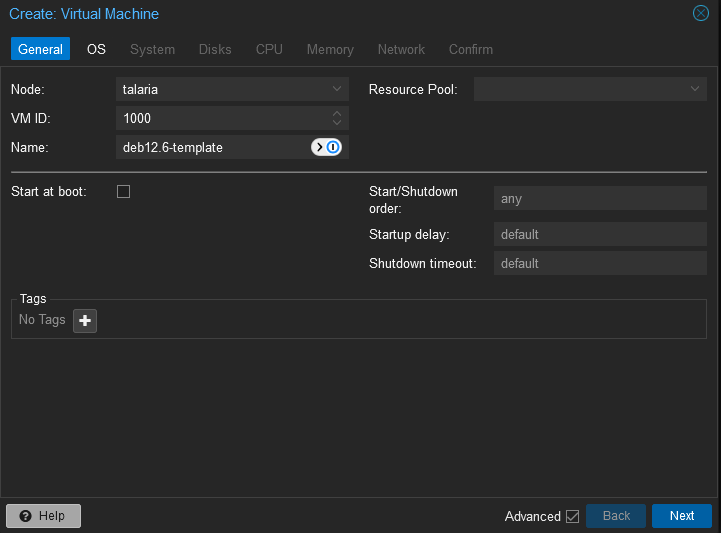
I set a separate VM ID range for templates to simplify visual automatic sorting.
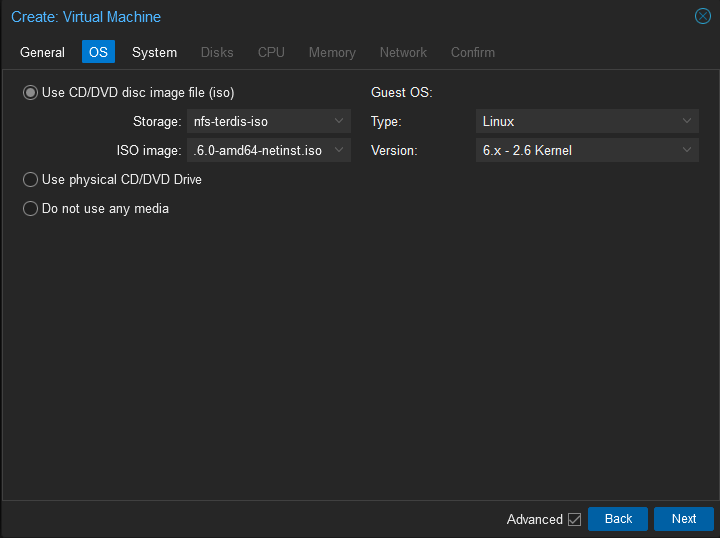
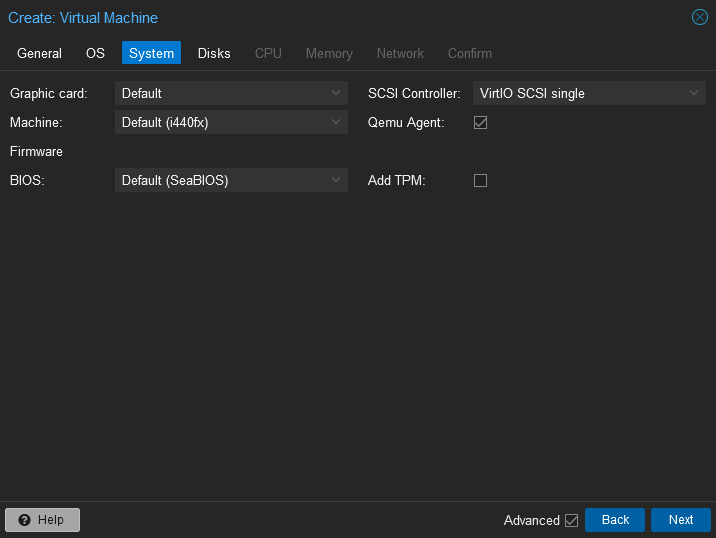
Note: Paravirtualized hardware is still the optimal choice, like with vSphere - but in this case, VirtIO is the code supplier.
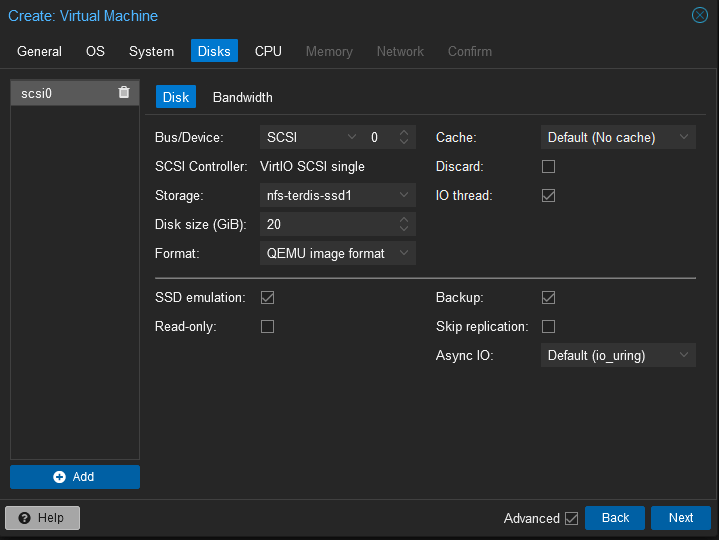
Note: SSD Emulation and qemu-agent are required for virtual disk reclamation with QEMU. This is particularly important in my lab.
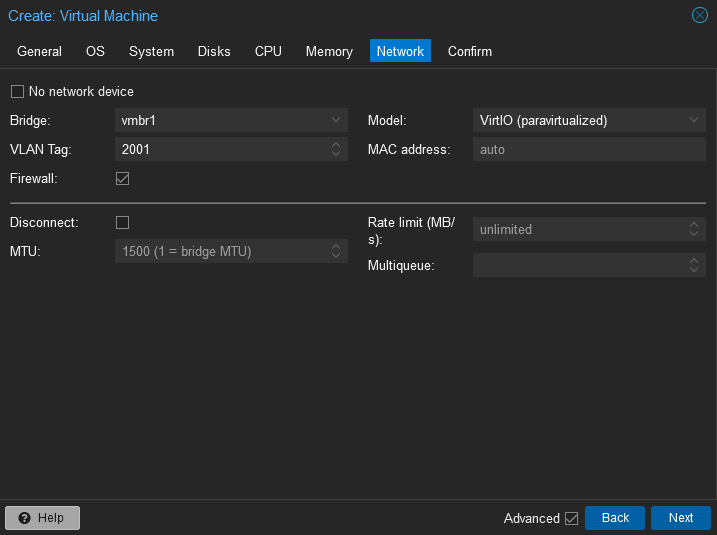
In this installation, I’m using paravirtualized network adapters and have separated my management(vmbr0) and data plane(vmbr1)
Debian Linux Setup
I’ll skip the Linux installer parts for brevity, Debian’s installer is excellent and easy to use.
At a high level, we’ll want to do some preparatory steps before declaring this a usable base image:
- Create users
- Recommended approach: Create a bootstrap user, then shred it
- Leave the
bootstrapuser with an SSH key on the base image - After creation, build a
takeoverplaybook that installs the latest and greatest username table,sssd, SSH keys, APM, anything with confidential cryptographic material that should not be left unencrypted on the hypervisor - This won’t slow the VM deployment speed by as much as you think
- Leave the
- Recommended approach: Create a bootstrap user, then shred it
- Install packages
- This is just a list of some basics that I prefer to add to each machine. It’s more network-centric; anything more comprehensive should be part of a build playbook specific to whatever’s being deployed.
- Note: This is an Ansible playbook, and therefore, it needs Ansible to run (
apt install ansible)
---
- name: "Debian machine prep"
  hosts: localhost
  tasks:
  - name: "Install standard packages"
    ansible.builtin.apt:
      pkg:
        - 'curl'
        - 'dnsutils'
        - 'diffutils'
        - 'ethtool'
        - 'git'
        - 'mtr'
        - 'net-tools'
        - 'netcat-traditional'
        - 'python3-requests'
        - 'python3-jinja2'
        - 'tcpdump'
        - 'telnet'
        - 'traceroute'
        - 'qemu-guest-agent'
        - 'vim'
        - 'wget'
- Clean up the disk. This will make our base image more compact - each clone will inherit any wasted space, so consider it a 10,20x savings in disk usage. I leave this as a file on the base image and name it
reset_vm.sh:
#!/bin/bash

# Clean Apt
apt clean

# Cleaning logs.
if [ -f /var/log/audit/audit.log ]; then
  cat /dev/null > /var/log/audit/audit.log
fi
if [ -f /var/log/wtmp ]; then
  cat /dev/null > /var/log/wtmp
fi
if [ -f /var/log/lastlog ]; then
  cat /dev/null > /var/log/lastlog
fi

# Cleaning udev rules.
if [ -f /etc/udev/rules.d/70-persistent-net.rules ]; then
  rm /etc/udev/rules.d/70-persistent-net.rules
fi

# Cleaning the /tmp directories
rm -rf /tmp/*
rm -rf /var/tmp/*

# Cleaning the SSH host keys
rm -f /etc/ssh/ssh_host_*

# Cleaning the machine-id
truncate -s 0 /etc/machine-id
rm /var/lib/dbus/machine-id
ln -s /etc/machine-id /var/lib/dbus/machine-id

# Cleaning the shell history
unset HISTFILE
history -cw
echo > ~/.bash_history
rm -fr /root/.bash_history

# Truncating hostname, hosts, resolv.conf and setting hostname to localhost
truncate -s 0 /etc/{hostname,hosts,resolv.conf}
hostnamectl set-hostname localhost

# Clean cloud-init - deprecated because cloud-init isn't currently used
# cloud-init clean -s -l

# Force a filesystem sync
sync
Shutdown the Virtual Machine. I prefer to start it back up and shut it down from the hypervisor to ensure that qemu-guest-agent is working properly.
Deployment Pipeline
First, we will want to create an API token under “Datacenter -> Permissions -> API Tokens”:
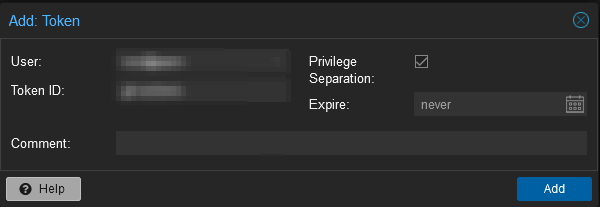
There are some oddities with the Ansible proxmoxer based module and Ansible to keep in mind:
api_useris needed and used by the API client, formatted as{{ user }}@domainapi_token_idis not the same as the output from the command, it’s what you put into the “Token ID” field.{{ api_user}}!{{ api_token_id }}should form the combined credential presented to the API, and match the created token.
If you attempt to use the output from the API creation screen under api_user or api_token_id, it’ll return a 401 Invalid user without much explanation as to what might be the issue.
Here’s the pipeline. Github’s primary job is to set up the Python/Ansible environment, and translate the workflow inputs into something that Ansible can properly digest.
I also added some cat steps - this allows us to use the GitHub Actions log to store intent until Netbox registration completes.
---
name: "On-Demand: Build VM on Proxmox"

on:
  workflow_dispatch:
    inputs:
      machine_name:
        description: "Machine Name"
        required: true
        default: "examplename"
      machine_id:
        description: "VM ID (can't re-use)"
        required: true
      template:
        description: "VM Template Name"
        required: true
        type: choice
        options:
          - deb12.6-template
        default: "deb12.6-template"
      hardware_cpus:
        description: "VM vCPU Count"
        required: true
        default: "1"
      hardware_memory:
        description: "VM Memory Allocation (in MB)"
        required: true
        default: "512"

permissions:
  contents: read

jobs:
  build:
    runs-on: self-hosted
    steps:
      - uses: actions/checkout@v4
      - name: Create Variable YAML File
        run: |
          cat <<EOF > roles/proxmox_kvm/parameters.yaml
          ---
            vm_data:
              name: "${{ github.event.inputs.machine_name }}"
              id: ${{ github.event.inputs.machine_id }}
              template: "${{ github.event.inputs.template }}"
              node: node
              hardware:
                cpus: ${{ github.event.inputs.hardware_cpus }}
                memory: ${{ github.event.inputs.hardware_memory }}
                storage: ssd-tier
                format: qcow2
          EOF
      - name: Build VM
        run: |
          cd roles/proxmox_kvm/
          cat parameters.yaml
          python3 -m venv .
          source bin/activate
          python3 -m pip install --upgrade pip
          python3 -m pip install -r requirements.txt
          python3 --version
          ansible --version

          export PAPIUSER="${{ secrets.PAPIUSER }}"
          export PAPI_TOKEN="${{ secrets.PAPI_TOKEN }}"
          export PAPI_SECRET="${{ secrets.PAPI_SECRET }}"
          export PHOSTNAME="${{ secrets.PHOSTNAME }}"
          export NETBOX_TOKEN="${{ secrets.NETBOX_TOKEN }}"
          export NETBOX_URL="${{ secrets.NETBOX_URL }}"
          export NETBOX_CLUSTER="${{ secrets.NETBOX_CLUSTER_PROX }}"
          ansible-playbook build_vm_prox.yml
In addition, a requirements.txt is required by GitHub to set up the venv, and belongs in the role folder (roles/proxmox_kvm as above):
###### Requirements without Version Specifiers ######
pytz
netaddr
django
jinja2
requests
pynetbox

###### Requirements with Version Specifiers ######
ansible >= 8.4.0              # Mostly just don't use old Ansible (e.g. v2, v3)
proxmoxer >= 2.0.0
This Ansible playbook also integrates Netbox, as my vSphere workflow did, and uses a common schema to simplify code re-use. There are a few quirks with the Proxmox playbooks:
- There’s no module to grab VM Guest network information, but the API provides it, so I can get it with
uri - Proxmox has a nasty habit of breaking Ansible with JSON keys that include
-. The best way to fix it is with a debug action:{{ prox_network_result.json.data | replace('-','_') }} - Proxmox’s VM copy needs a timeout configured, and announces it’s done before the VM is ready for actions. I added an
ansible.builtin.pausestep before starting the VM, and after (to allow it to boot)
---
- name: "Build VM on Proxmox"
  hosts: localhost
  gather_facts: true
  # Before executing ensure that the prerequisites are installed
  # `ansible-galaxy collection install netbox.netbox`
  # `python3 -m pip install aiohttp pynetbox`
  # We start with a pre-check playbook, if it fails, we don't want to
  # make changes
  any_errors_fatal: true
  vars_files:
    - "parameters.yaml"

  tasks:
    - name: "Debug"
      ansible.builtin.debug:
        msg: '{{ vm_data }}'
    - name: "Test connectivity and authentication"
      community.general.proxmox_node_info:
        api_host: '{{ lookup("env", "PHOSTNAME") }}'
        api_user: '{{ lookup("env", "PAPIUSER") }}'
        api_token_id: '{{ lookup("env", "PAPI_TOKEN") }}'
        api_token_secret: '{{ lookup("env", "PAPI_SECRET") }}'
      register: prox_node_result
    - name: "Display Node Data"
      ansible.builtin.debug:
        msg: '{{ prox_node_result }}'
    - name: "Build the VM"
      community.general.proxmox_kvm:
        api_host: '{{ lookup("env", "PHOSTNAME") }}'
        api_user: '{{ lookup("env", "PAPIUSER") }}'
        api_token_id: '{{ lookup("env", "PAPI_TOKEN") }}'
        api_token_secret: '{{ lookup("env", "PAPI_SECRET") }}'
        name: '{{ vm_data.name }}'
        node: '{{ vm_data.node }}'
        storage: '{{ vm_data.hardware.storage }}'
        newid: '{{ vm_data.id }}'
        clone: '{{ vm_data.template }}'
        format: '{{ vm_data.hardware.format }}'
        timeout: 500
        state: present
    - name: "Wait for the VM to fully register"
      ansible.builtin.pause:
        seconds: 15
    - name: "Start the VM"
      community.general.proxmox_kvm:
        api_host: '{{ lookup("env", "PHOSTNAME") }}'
        api_user: '{{ lookup("env", "PAPIUSER") }}'
        api_token_id: '{{ lookup("env", "PAPI_TOKEN") }}'
        api_token_secret: '{{ lookup("env", "PAPI_SECRET") }}'
        name: '{{ vm_data.name }}'
        state: started
    - name: "Wait for the VM to fully boot"
      ansible.builtin.pause:
        seconds: 45
    - name: "Get VM information"
      community.general.proxmox_vm_info:
        api_host: '{{ lookup("env", "PHOSTNAME") }}'
        api_user: '{{ lookup("env", "PAPIUSER") }}'
        api_token_id: '{{ lookup("env", "PAPI_TOKEN") }}'
        api_token_secret: '{{ lookup("env", "PAPI_SECRET") }}'
        vmid: '{{ vm_data.id }}'
      register: prox_vm_result
    - name: "Report the VM!"
      ansible.builtin.debug:
        var: prox_vm_result
    - name: "Fetch VM Networking information"
      ansible.builtin.uri:
        url: 'https://{{ lookup("env", "PHOSTNAME") }}:8006/api2/json/nodes/{{ vm_data.node }}/qemu/{{ vm_data.id }}/agent/network-get-interfaces'
        method: 'GET'
        headers:
          Content-Type: 'application/json'
          Authorization: 'PVEAPIToken={{ lookup("env", "PAPIUSER") }}!{{ lookup("env", "PAPI_TOKEN") }}={{ lookup("env", "PAPI_SECRET") }}'
        validate_certs: false
      register: prox_network_result
    - name: "Refactor Network Information"
      ansible.builtin.debug:
        msg: "{{ prox_network_result.json.data | replace('-','_') }}"
      register: prox_network_result_modified
    - name: "Register the VM in Netbox!"
      netbox.netbox.netbox_virtual_machine:
        netbox_token: '{{ lookup("env", "NETBOX_TOKEN") }}'
        netbox_url: '{{ lookup("env", "NETBOX_URL") }}'
        validate_certs: false
        data:
          cluster: '{{ lookup("env", "NETBOX_CLUSTER") }}'
          name: '{{ vm_data.name }}'
          description: 'Built by the GH Actions Pipeline!'
          local_context_data: '{{ prox_vm_result }}'
          memory: '{{ vm_data.hardware.memory }}'
          vcpus: '{{ vm_data.hardware.cpus }}'
    - name: "Configure VM Interface in Netbox!"
      netbox.netbox.netbox_vm_interface:
        netbox_token: '{{ lookup("env", "NETBOX_TOKEN") }}'
        netbox_url: '{{ lookup("env", "NETBOX_URL") }}'
        validate_certs: false
        data:
          name: '{{ vm_data.name }}_intf_{{ item.hardware_address | replace(":", "") | safe }}'
          virtual_machine: '{{ vm_data.name }}'
          vrf: 'Campus'
          mac_address: '{{ item.hardware_address }}'
      with_items: '{{ prox_network_result_modified.msg.result }}'
      when: item.hardware_address != '00:00:00:00:00:00'
    - name: "Reserve IP"
      netbox.netbox.netbox_ip_address:
        netbox_token: '{{ lookup("env", "NETBOX_TOKEN") }}'
        netbox_url: '{{ lookup("env", "NETBOX_URL") }}'
        validate_certs: false
        data:
          address: '{{ item.ip_addresses[0].ip_address }}/{{ item.ip_addresses[0].prefix }}'
          vrf: 'Campus'
          assigned_object:
            virtual_machine: '{{ vm_data.name }}'
        state: present
      with_items: '{{ prox_network_result_modified.msg.result }}'
      when: item.hardware_address != '00:00:00:00:00:00'
    - name: "Finalize the VM in Netbox!"
      netbox.netbox.netbox_virtual_machine:
        netbox_token: '{{ lookup("env", "NETBOX_TOKEN") }}'
        netbox_url: '{{ lookup("env", "NETBOX_URL") }}'
        validate_certs: false
        data:
          cluster: '{{ lookup("env", "NETBOX_CLUSTER") }}'
          tags:
            - 'lab_debian_machines'
            - 'lab_linux_machines'
            - 'lab_apt_updates'
          name: '{{ vm_data.name }}'
          primary_ip4:
            address: '{{ item.ip_addresses[0].ip_address }}/{{ item.ip_addresses[0].prefix }}'
            vrf: "Campus"
      with_items: '{{ prox_network_result_modified.msg.result }}'
      when: item.hardware_address != '00:00:00:00:00:00'
Conclusion
Overall, the Proxmox API/playbooks are quite a bit simpler to use than the VMware ones. The proxmoxer based modules are relatively feature complete compared to vmware_rest, but the largest exception I found (examples not in this post) was that I could always fall back to Ansible’s comprehensive Linux foundation to fill any gaps I needed to. It’s a refreshing change.