
What happens to packets with a VMware vSphere Distributed Switch?
Distributed Virtual Port-Groups (dvPGs) in vSphere are a powerful tool for controlling network traffic behavior. vSphere Distributed Switches (vDS) are non-transitive Layer 2 proxies and provide us the ability to modify packets in-flight in a variety of complex ways.
Note: Cisco UCS implements something similar with their Fabric Interconnects, but software control of behavior is key here.
Where do the packets go?
Let’s start with a packet flow diagram:
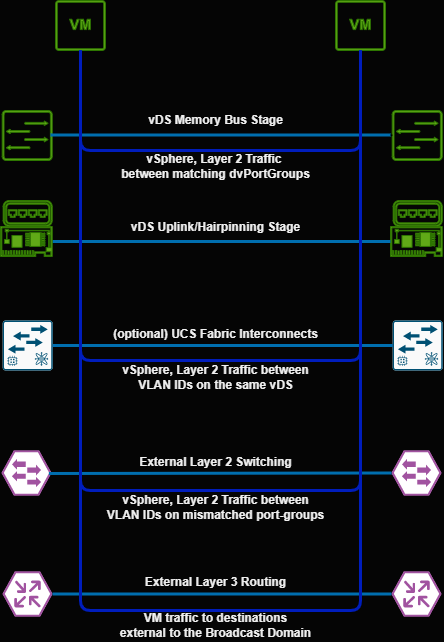
ESXi evaluates a combination of source and destination dvPG/MAC address conditions and will ship the packet to one of the following “stages”:
- vDS Memory Bus: This is only an option if the source and destination VM are both on the same port-group and the same host
- vDS Uplink Stage: This is where the vSphere Distributed Switch receives the traffic from the vnic and applies any proxy settings
- UCS FI: In Cisco UCS Environments configured in end-host mode, traffic will depend on the vSphere Distributed Switch’s uplink pinning, as Fabric Interconnects do not transit between redundant nodes. If they are configured in transitive node, they function as external layer 2 switches
- External Switching: If the destination is in the same broadcast domain (determined by network/host bits) packets will flow via the access layer (or higher layers depending on the network design)
- External Layer 3 Routing: Traffic outside of the broadcast domain is forwarded to the default gateway for handling
Testing The Hypothesis
vDS tries to optimize VM-to-VM traffic to the shortest possible path. If a Virtual Machine attempts to reach another Virtual Machine on the same host, and same dvPG, ESXi will open up a path via the host’s local memory bus to transfer the Ethernet traffic.
This hypothesis is verifiable by creating two virtual machines on the same port-group. If the machines in question are on the same host, it will not matter if the VLAN in question isn’t trunked to the host, an important thing to keep in mind when troubleshooting.
An easy method to test the hypothesis is to start an iperf session between two VMs, and change the layout accordingly. The bandwidth available between hosts will often differ between the memory bus and the network adapters provisioned.
For this example, we will execute an iPerf TCP test with default settings between 2 VMs on the same port-group, then vMotion the server to another host and repeat the test.
- Output (Same Host, same dvPG):
    root@host:~# iperf -c IP
    ------------------------------------------------------------
    Client connecting to IP, TCP port 5001
    TCP window size:  357 KByte (default)
    ------------------------------------------------------------
    [  3] local IP port 33260 connected with IP port 5001
    [ ID] Interval       Transfer     Bandwidth
    [  3] 0.0000-10.0013 sec  6.98 GBytes  6.00 Gbits/sec
- Output (Different host, same dvPG):
    root@host:~# iperf -c IP
            ------------------------------------------------------------
    Client connecting to IP, TCP port 5001
    TCP window size: 85.0 KByte (default)
    ------------------------------------------------------------
    [  3] local IP port 59478 connected with IP port 5001
    [ ID] Interval       Transfer     Bandwidth
    [  3] 0.0000-10.0009 sec  10.5 GBytes  9.06 Gbits/sec
Troubleshooting
Understanding vSphere Distributed Switch packet flow is key when trying to assess networking issues. The shared memory bus provided by ESXi is a powerful tool when ensuring short, inconsistent paths are used over longer, more consistent ones.
When constructing the VMware Validated Design (VVD) and the system defaults that ship with ESXi, the system architects chose a “one size fits most” strategy. This network behavior would be desirable with Gigabit data centers or edge PoPs, or anywhere the network speed would be less than the memory bus. In most server hardware, system memory buses will exceed backend network adapters’ capacity, improving performance with small clusters. It’s important to realize that VMware doesn’t just sell software to large enterprises - cheaper, smaller deployments make up the majority of customers.
Impacts on Design
Shorter paths are not always desirable. In my lab, hardware offloads like TCP Segmentation Offload (TSO) are available and will make traffic more performant outwards. Newer hardware architectures, particularly 100GbE(802.3by), benefit from relying on the network adapter for encapsulation/decapsulation work instead of CPU resources better allocated to VMs.
This particular “feature” is straightforward to design around. The vSphere Distributed Switch provides us the requisite tools to achieve our aims, and we can follow several paths to control behavior to match design:
- When engineering for high performance/network offload, creating multiple port-groups with tunable parameters is something a VI administrator should be comfortable doing. Automating port-group deployment and managing the configuration as code is even better.
- If necessary, consider SR-IOV for truly performance intensive workloads.
- The default is still good for 9 of 10 use cases. Design complexity doesn’t make a VI administrator “leet”; consider any deviation from recommended carefully.
As always, it’s important to know oneself (your environment) before making any design decision. Few localized Virtual Machines concentrate enough traffic to benefit from additional tuning. Real-world performance testing will indicate when these design practices are necessary.