
Using VM Templates and NSX-T for Repeatable Virtual Network Deployments
So far, we’ve provided the infrastructure for continuous delivery / continuous integration, but it’s been for those other guys.
Is that odd?
Let’s try using the principles provided for more infrastructure-oriented reasons. Let’s build a network lab using NSX-T.
First, we need some form of a mutable router. Normally, that’d be whatever flavor’s “in production,” but the specific implementation doesn’t really matter.
First, we need to outline what basic functionality would need to be in place for this basic image to work:
- Management Plane isolation: Build a separate “routing table,” or VRF for the first applied interface.
- Automatic connectivity. We should have some way to automatically get network connectivity separate from the “data plane,” and perform configuration loading, command invocations, and software lifecycle management.
- Enable inbound management protocols.
I have built a light configuration to do that here.
Once operational, we will want a good process to keep software up-to-date. Once established with this basic configuration, it’ll be possible to SSH into this device and run the update process. Here’s how:
vyos@vyos:~$ add system image https://downloads.vyos.io/rolling/current/amd64/vyos-rolling-latest.iso vrf mgmt
Trying to fetch ISO file from https://downloads.vyos.io/rolling/current/amd64/vyos-rolling-latest.iso
  % Total    % Received % Xferd  Average Speed   Time    Time     Time  Current
                                 Dload  Upload   Total   Spent    Left  Speed
100  309M  100  309M    0     0  1424k      0  0:03:42  0:03:42 --:--:-- 1551k
ISO download succeeded.
Checking for digital signature file...
  % Total    % Received % Xferd  Average Speed   Time    Time     Time  Current
                                 Dload  Upload   Total   Spent    Left  Speed
  0     0    0     0    0     0      0      0 --:--:-- --:--:-- --:--:--     0
curl: (22) The requested URL returned error: 404 Not Found
Unable to fetch digital signature file.
Do you want to continue without signature check? (yes/no) [yes] yes
Checking MD5 checksums of files on the ISO image...OK.
Done!
What would you like to name this image? [1.3-rolling-202010020117]:
OK.  This image will be named: 1.3-rolling-202010020117
Installing "1.3-rolling-202010020117" image.
Copying new release files...
Would you like to save the current configuration
directory and config file? (Yes/No) [Yes]: Yes
Copying current configuration...
Would you like to save the SSH host keys from your
current configuration? (Yes/No) [Yes]:
Copying SSH keys...
Running post-install script...
Setting up grub configuration...
Done.
vyos@vyos:~$ show system image
The system currently has the following image(s) installed:

   1: 1.3-rolling-202010020117 (default boot)
   2: 1.3-rolling-202009200118
vyos@vyos:~$ reboot
Are you sure you want to reboot this system? [y/N] y

...

vyos@vyos:~$ show system image
The system currently has the following image(s) installed:

   1: 1.3-rolling-202010020117 (default boot) (running image)
   2: 1.3-rolling-202009200118

vyos@vyos:~$ delete system image
Possible completions:
  Enter       Execute the current command
  1.3-rolling-202009200118
                Name of image image to delete
  1.3-rolling-202010020117

vyos@vyos:~$ delete system image 1.3-rolling-202009200118
Are you sure you want to delete the
"1.3-rolling-202009200118" image? (Yes/No) [No]: Yes
Deleting the "1.3-rolling-202009200118" image...
Done
Ta-da! new version! We cleaned up the old image for disk space compaction as well.
Our virtual router is built - let’s shut it down, and then convert it to a template:
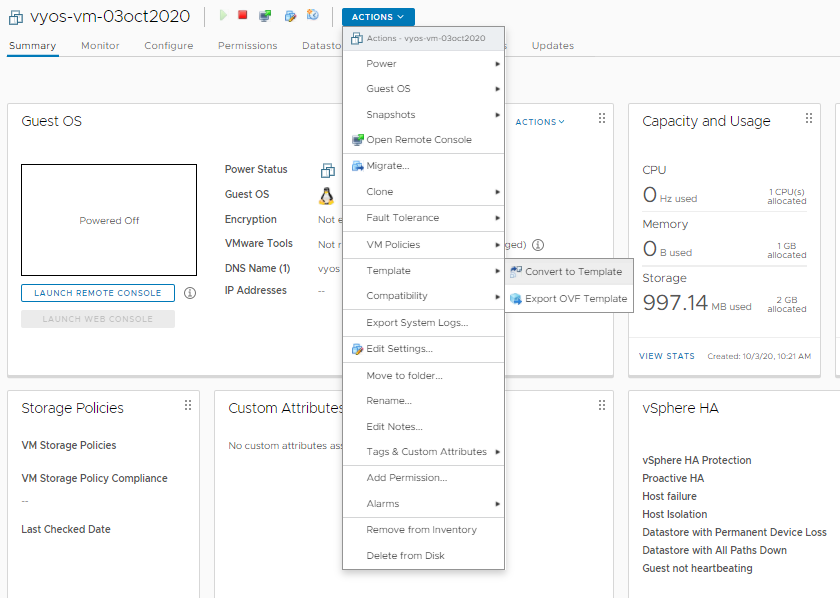
Ready to go!