
VyOS and other Linux builds unable to use `vmxnet3` or "VMware Paravirtual SCSI" adapter on vSphere
Have you seen this selector when building machines on vSphere?

This causes some fairly common issues in NOS VMs, as most don’t really know what distribution the NOS is based on.
“Guest OS Version” doesn’t just categorize your workload, though. Selecting “Other Linux” instructs vSphere to maximize compatibility and ensure the VI admin receives a reliable deployment - which means it’ll run some pretty old virtual hardware.
VMware curates its lifecycle “Guest OS” settings here. Note that “Other” isn’t described: https://partnerweb.vmware.com/GOSIG/home.html
Two commonly preferred settings for virtual hardware aren’t available with this particular OS setting, and they both cause potential performance issues:
- LSI Logic Virtual SCSI
- Intel E1000 NIC <—If you’re wondering, it will drop your VM’s throughput
Let’s cover how we’d fix this in vSphere 7 with a VM. The example in this procedure is VyOS 1.4.
Updating Paravirtualized Hardware
First, let’s change the Guest OS version to something more specific. Generally, Linux distributions fall under two categories, Red-Hat, and Debian derivatives - Gentoo/Arch users won’t be covered here because they should be able to find their own way out.
Since we know VyOS is a well-maintained distribution, I’ll change it to “Debian 11.” While this is technically lying, we’re trying to provide a reference hardware version to the virtual machine, not accurately represent the workload. This menu can be reached by selecting “edit VM” on the vSphere console:
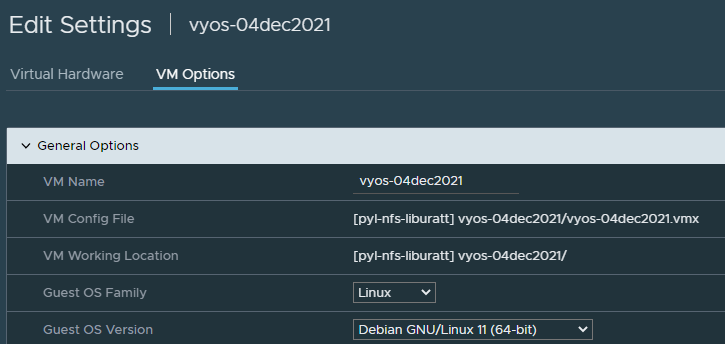
Second, let’s change the SCSI Adapter:
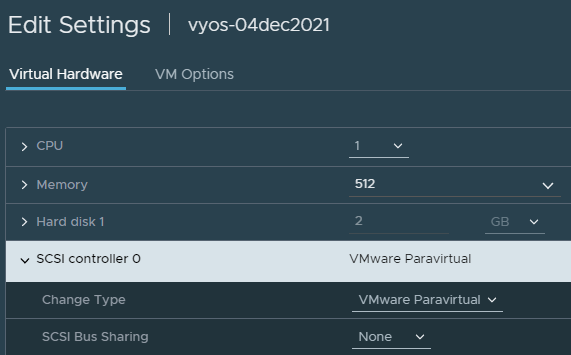
Replacing network adapters will take a little bit more work. Re-typing existing interfaces is not currently supported in vSphere 7, so we’ll need to delete and re-create. In this example, we can set a static MAC address so that the guest distribution can correlate the new adapter to the same interface by setting the MAC Address field to static. Since I’m life cycling a VM template, I don’t want to do that!
If you’re editing an existing VM, make a backup. If it’s a NOS, export the configuration. There is no guarantee that the configurations will port over perfectly, and you will want a restore point. Fortunately, lots of options exist in the VMware ecosystem to handle this!
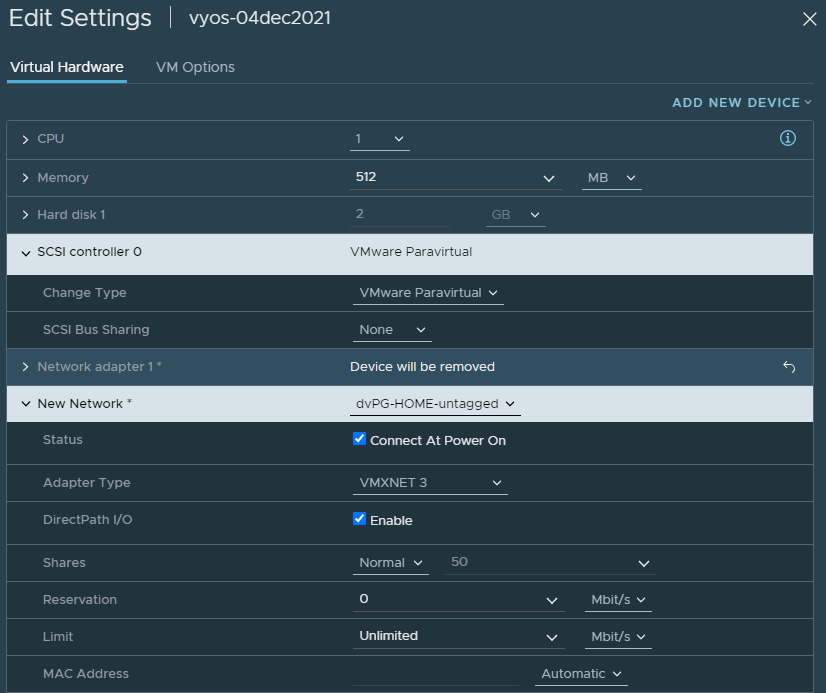
Refactoring / Recovering from the change
With my template VM, the only issues presented were that the interface re-numbered and the VRF needed to be re-assigned:
set interfaces ethernet eth2 address dhcp
set interfaces ethernet eth2 vrf mgmt
commit
save
Since we have the VM awake and in non-template-form, we can update the NOS too. (Guide here: https://docs.vyos.io/en/latest/installation/update.html)
vyos@vyos:~$ add system image https://downloads.vyos.io/rolling/current/amd64/vyos-rolling-latest.iso vrf mgmt
Trying to fetch ISO file from https://downloads.vyos.io/rolling/current/amd64/vyos-rolling-latest.iso
% Total % Received % Xferd Average Speed Time Time Time Current
Dload Upload Total Spent Left Speed
100 436M 100 436M 0 0 12.0M 0 0:00:36 0:00:36 --:--:-- 11.7M
ISO download succeeded.
Checking SHA256 (256-bit) checksum...
% Total % Received % Xferd Average Speed Time Time Time Current
Dload Upload Total Spent Left Speed
100 106 100 106 0 0 215 0 --:--:-- --:--:-- --:--:-- 215
Found it. Verifying checksum...
SHA256 checksum valid.
Checking for digital signature file...
% Total % Received % Xferd Average Speed Time Time Time Current
Dload Upload Total Spent Left Speed
0 0 0 0 0 0 0 0 --:--:-- --:--:-- --:--:-- 0
curl: (22) The requested URL returned error: 404
Unable to fetch digital signature file.
Do you want to continue without signature check? (yes/no) \[yes\]
Checking MD5 checksums of files on the ISO image...OK.
Done!
What would you like to name this image? \[1.4-rolling-202112040649\]:
OK. This image will be named: 1.4-rolling-202112040649
Installing "1.4-rolling-202112040649" image.
Copying new release files...
Would you like to save the current configuration
directory and config file? (Yes/No) \[Yes\]: Yes
Copying current configuration...
Would you like to save the SSH host keys from your
current configuration? (Yes/No) \[Yes\]: No
Running post-install script...
Setting up grub configuration...
Done.
vyos@vyos:~$ show system image
The system currently has the following image(s) installed:

1: 1.4-rolling-202112040649 (default boot)
2: 1.4-rolling-202103130218 (running image)

vyos@vyos:~$ reboot
Are you sure you want to reboot this system? \[y/N\] y
Recap
To cover the major points of this article:
- Selecting “Guest OS” in vSphere can present significant performance improvements or problems depending on what you choose. The selector chooses what PV hardware to provide to a VM, and it’ll try to preserve compatibility and be conservative.
- VM Hardware is a separate knob entirely, updating it won’t make the newer hardware available without the “Guest OS” selector
- Consult your NOS vendor on what to select here, if applicable, and require them to provide you documentation on why.
Some additional tangential benefits are present as a result of this change. For example, VM power actions work:
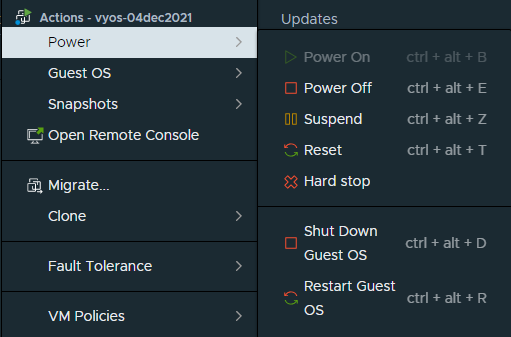
Since we’re done, let’s check this change into the image library:
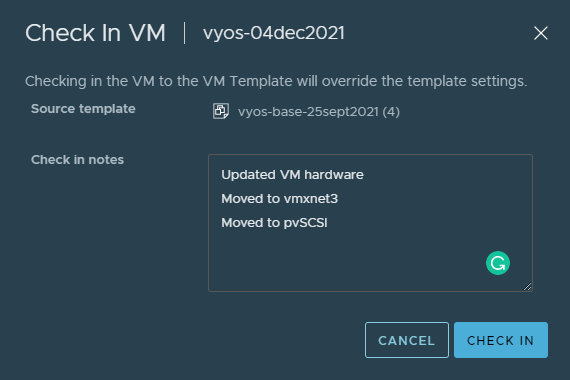
Reference: https://blog.engyak.co/2020/10/using-vm-templates-and-nsx-t-for/